Your Android device is actually a Linux computer beneath the surface, and it can capture studio-quality audio. Finding the right audio recording app feels like looking for a needle in a haystack.
At the time I began testing recording apps for my podcast interviews, I needed something that could create immersive, intimate soundscapes without expensive gear. Most Android phones come with built-in recording apps, but they barely scratch the surface of what’s possible. My extensive testing found that there was no single “best” recording app for Android – it really depends on what you need. Professional audio recording capabilities and budget-friendly options vary widely. The experts rate Riverside as the best overall voice recorder, while Easy Voice Recorder gets top marks specifically for Android users.
This piece will show you 15 audio recording apps for Android that create studio-quality results. Each app has undergone my personal testing. I focused on options that deliver high sample rates (44.1 kHz or 48 kHz) and practical features that work for everything from songwriting on the go to multi-track recording. Let’s explore and find the perfect recording solution that matches your needs.
Riverside

Image Source: riverside.com
Riverside has quickly risen to become the preferred audio recording app among professional content creators. This app stands out because it records each participant’s audio locally on their device before uploading to the cloud. This approach gives you crystal-clear quality no matter how stable your internet connection is.
Key Features of Riverside
The app delivers crystal-clear audio with uncompressed 48kHz WAV files and video resolution up to 4K. You get separate audio and video tracks for each participant, which gives you total control during editing. The “Magic Editor” will switch the speaker view automatically based on who’s talking.
Recent AI-powered tools have changed how content creators work with the platform:
- A feature that turns recordings into text
- A teleprompter that makes script reading natural
- An AI Show Notes Writer that creates summaries with timestamps
- Magic Audio that cuts noise and improves sound quality
The mobile app lets you record anywhere by turning your Android device into a professional recording studio. It uses the same high-quality local recording technology.
Riverside Pros and Cons
Pros:
- Local recording keeps quality high even with internet problems
- Separate audio/video tracks give you more editing options
- Background uploads happen while you record
- You can stream live to multiple platforms at once
- Text-based editing speeds up post-production
Cons:
- Poor internet can cause upload problems for guests
- New users need time to learn the interface
- The free version caps video quality at 720p
Riverside Pricing
Riverside has different pricing tiers to match your needs:
- Free: 2 hours of multi-track recording, 720p video, 44.1 kHz audio with watermark
- Pro: USD 24.00/month (billed annually) or USD 29.00/month (billed monthly), has 4K video, 48kHz audio, 15 hours of multi-track recording
- Live: USD 34.00/month (billed annually), adds multi-streaming capabilities
- Webinar: USD 79.00/month (billed annually), includes webinar hosting for up to 100 registrants
Who Should Use Riverside
Content creators who care about audio quality will find great value in Riverside. Podcasters doing remote interviews, media companies creating professional content, and marketers making polished video materials will benefit most. The separate tracks feature makes editing much easier for anyone recording with multiple participants. Android users get a professional audio recording app that combines smoothly with desktop environments.
Lexis Audio Editor

Image Source: Soft112
Lexis Audio Editor strikes an impressive balance between simplicity and power. Musicians and hobbyists will find a complete yet user-friendly audio editor that packs professional-grade tools similar to desktop software. You can create new recordings and edit existing audio files with ease.
Key Features of Lexis Audio Editor
Lexis Audio Editor combines simple and advanced editing tools:
- 10-band equalizer to fine-tune sound
- Noise reduction and normalization to clean up recordings
- Compressor to balance audio levels
- Tempo, speed, and pitch adjustment tools
- Cut, copy, paste, delete, trim, and fade effects
- Recording into existing files or importing files into current projects
- Support for multiple audio formats including MP3, WAV, FLAC, M4A, AAC, and WMA
- Video audio extraction from MP4, 3GP, and 3G2 files
Lexis Audio Editor Pros and Cons
Pros:
- User-friendly design makes editing available to beginners
- Supports many file formats to import and export
- Complete editing toolkit with simple and advanced features
- Works on Windows, Android, and iOS platforms
Cons:
- No multi-track functionality like competitors
- Free version shows ads during conversions
- MP3 saving works only in paid version
- Needs substantial device memory (500MB recommended for 10-minute stereo files)
Lexis Audio Editor Pricing
The trial version includes almost every feature and lets you save in WAV, M4A, AAC, FLAC, and WMA formats. MP3 saving is only available in the paid version. A one-time purchase makes this tool more cost-effective than subscription-based alternatives.
Who Should Use Lexis Audio Editor
Musicians can create and refine tracks on the go while podcasters make quick edits. Content creators will find the audio cleanup tools helpful. The software works well for both beginners and intermediate users because it balances professional features with ease of use. Android users get complete audio editing without complex interfaces or expensive subscriptions. Users who work on multiple devices benefit from consistent editing capabilities across platforms.
ASR Voice Recorder

Image Source: BlueStacks
ASR Voice Recorder delivers outstanding versatility for audio capture on Android devices. The app has been around for 10 years and got a modern makeover that brings format flexibility and cloud integration options.
Key Features of ASR Voice Recorder
ASR supports an impressive range of recording formats like MP3, WAV, OGG, FLAC, M4A, and AMR. You can use it for many different audio projects. The silence skipping feature shortens recordings by pausing during quiet moments.
The app goes beyond simple recording with these advanced features:
- Recording profiles to adjust settings for different situations
- Gain control to fine-tune recording volume
- Playback speed adjustments for easier review
- Bookmarking feature to mark key moments
- Background recording functionality
- Bluetooth headset microphone support
The app now features OpenAI’s Whisper speech-to-text service to improve its transcription capabilities. It also connects with Google Drive, Dropbox, OneDrive, and other services for continuous backup.
ASR Voice Recorder Pros and Cons
Pros:
- Support for many formats gives you flexibility for different quality needs
- Playback speed control makes reviewing long recordings easier
- One-tap recording access through widget support
- You can add notes during recording or playback
- Sample and bit rate options to control quality
Cons:
- Free version shows ads that some users find intrusive
- The interface can feel cluttered
- Some users have reported issues with saving recordings
ASR Voice Recorder Pricing
The app offers straightforward pricing options:
- Free version with ads that has most features
- One-time premium purchase at $9.99
- Annual subscription for $2.49 per year
Users can access all premium features in the free version if they don’t mind watching ads.
Who Should Use ASR Voice Recorder
The app’s format support and cloud integration make it perfect for users who need flexible recording options. It shines when recording meetings, lectures, musical ideas, and personal notes. Students and professionals who record long sessions will find the bookmarking and silence-skipping features helpful to locate specific information quickly. Content creators will appreciate the flexible format options that match their publishing platform needs.
Easy Voice Recorder

Image Source: Google Play
Easy Voice Recorder lives up to its name as a straightforward audio recording app for Android devices. This handy companion app lets users of all technical levels capture important moments with a user-friendly approach, while delivering quality and functionality.
Key Features of Easy Voice Recorder
Easy Voice Recorder stands out with these capabilities:
- High-quality PCM and MP4 recording options, plus AMR format to save space
- Recording continues in background with quick access through widgets and shortcuts
- Smart watch users can record directly through Wear OS compatibility
- Users can control playback speed to find their comfortable listening pace
- The app matches your device’s look with light and dark themes
The Pro version has many more features. Users can automatically upload to Google Drive or Dropbox, use MP3/FLAC/AAC formats, connect Bluetooth microphones, and trim unwanted sections.
Easy Voice Recorder Pros and Cons
Pros:
- A user-friendly design that takes minutes to learn
- Record as long as you want in both free and pro versions
- Pro version works with Bluetooth headsets
- Ready-to-use recording modes for voice notes, meetings, and music
- Quick recording starts with widget support
Cons:
- Free version has basic audio quality options
- Pro version keeps advanced features like audio trimming
- Android devices only
Easy Voice Recorder Pricing
The pricing is simple:
- Free version comes with ads but includes core recording features
- Pro version costs $4.99 once (sometimes on sale for $2.50) without ads or extra purchases
Who Should Use Easy Voice Recorder
Easy Voice Recorder adapts well to different needs. Students can record lectures clearly, even from the back of the room. Business users record their meetings and interviews with ease. Musicians capture rehearsals and sudden bursts of inspiration. The app also helps anyone who needs to save voice notes or important conversations without technical hassle. Casual users will find everything they need in the free version. Content creators who want better formats and editing tools should consider the Pro upgrade.
Dolby On

Image Source: iMore
Dolby On leverages 50 years of audio engineering expertise to turn your Android device into a professional recording studio. The app automatically boosts every sound you capture. Its exceptional audio processing capabilities make it stand out from regular recording apps.
Key Features of Dolby On
Dolby On comes packed with remarkable features:
- One-tap recording with automatic studio effects including noise reduction, limiting, and spatial audio
- Dynamic EQ that automatically adapts to your music
- Noise reduction technology that eliminates electrical hum, amp buzz, and fan noise
- Six custom-designed Sound Tools (Standard, Amped, Lyric, Deep, Natural, Thump) that work like photo filters for audio
- Bass, treble, and boost controls to fine-tune your recordings
- Recording in lossless WAV format to achieve maximum quality
- Direct sharing to SoundCloud, Facebook, Instagram, and other platforms
Dolby On Pros and Cons
Pros:
- Professional-quality sound with just one tap
- Easy-to-use interface that needs minimal technical knowledge
- Automatic optimization of volume for popular music platforms
- Importing recordings from other apps for enhancement
- Completely free with no in-app purchases
Cons:
- Cannot share multiple files simultaneously
- Cannot pause recordings once started
- Video recording capabilities are somewhat limited
- No automatic saving to internal storage
Dolby On Pricing
Dolby On stands as the best value among professional recording apps. The app is completely free and includes no in-app purchases or paid features. Users get premium capabilities without any subscription or one-time payment.
Who Should Use Dolby On
Musicians and songwriters will find Dolby On particularly useful for recording music, voice, podcasts, rehearsals, and voice memos. Note that it works best for users who need studio-quality sound without technical expertise or extra equipment. Social media content creators will appreciate its quick enhancement features and direct sharing options.
Otter.ai

Image Source: Google Play
Otter.ai transforms how we capture conversations. This AI-powered meeting assistant creates automatic transcripts and summaries of your discussions. The app combines smoothly with Zoom, Microsoft Teams, and Google Meet.
Key Features of Otter.ai
Otter.ai packs powerful features for meeting documentation:
- Live transcription in English, French, and Spanish
- Automated meeting summaries with action items and outlines
- AI Chat that answers questions about meeting content
- Speaker identification to track who said what
- Slide capture for virtual meetings
- Calendar app integration for automatic meeting joining
Otter.ai Pros and Cons
Pros:
- Core features available in generous free plan
- Accessible interface on web and mobile platforms
- Searchable transcripts with keyword identification
- Users can highlight and comment on text during live meetings
Cons:
- Free and lower-tier plans have limited transcription minutes
- Accuracy drops with accents and specialized terms
- No offline access option
- Support limited to email and knowledge base
Otter.ai Pricing
Otter.ai’s pricing tiers include:
- Basic (Free): 300 monthly transcription minutes, 30 minutes per conversation
- Pro: USD 8.33/month/user (annual) or USD 16.99/month/user (monthly) with 1,200 minutes
- Business: USD 20.00/month/user (annual) or USD 30.00/month/user (monthly) with 6,000 minutes
- Enterprise: Custom pricing with advanced security features
Who Should Use Otter.ai
Otter.ai’s transcription capabilities help different groups work better. Sales teams get automatic follow-ups and CRM integration. Students and faculty create lecture transcripts and organized notes. Media teams speed up interview transcription and content creation. The tool helps anyone who needs to document and search conversations without manual notes.
Rev Voice Recorder

Image Source: Rev
Rev Voice Recorder stands out by combining professional recording capabilities with top-tier transcription services. Android users will find this app a powerful tool that captures audio and converts speech to text.
Key Features of Rev Voice Recorder
The mobile app shines with these notable features:
- Crystal-clear audio recordings that work even in noisy settings
- AI-generated transcripts appear as you record
- Your recordings sync between mobile and desktop devices
- You can upgrade to human transcription with 99%+ accuracy
- The app lets you highlight, edit and bookmark important parts
- Teams can share and edit content together
Rev Voice Recorder Pros and Cons
Pros:
- The easy-to-use interface lets you start recording with one tap
- Built-in noise reduction creates clearer audio
- Works smoothly with Rev’s transcription services
- Cloud storage keeps your files accessible on any device
Cons:
- You can record for free but transcription costs extra
- Audio editing options are limited compared to specialized editors
- Phone calls cannot be recorded
- Advanced audio formats are not supported
Rev Voice Recorder Pricing
Recording is free but transcription services come at different price points:
- Free tier gives you 45 minutes of AI transcription monthly
- Basic plan costs $9.99/month for 1,200 AI transcription minutes
- Pro plan runs $20.99/month with 6,000 shared minutes
- Human transcription is available at $1.99 per audio minute
Who Should Use Rev Voice Recorder
Legal professionals, researchers, journalists and content creators will find value in both the quality recordings and precise transcriptions. The app proves especially useful when you have interviews or meetings and need to focus on conversations instead of taking notes.
Voice Record Pro

Image Source: Google Play
Voice Record Pro lives up to its “Pro” name as one of the best audio recording apps for Android devices. The app shines with its extensive customization options and format choices. Users get professional-grade features with robust technical controls and plenty of ways to share their recordings.
Key Features of Voice Record Pro
Voice Record Pro comes packed with advanced features:
- Multiple recording formats including MP4 (AAC), MP3 (MPEG), and WAV (PCM)
- Seamless integration with Google Drive, Dropbox, and Microsoft OneDrive
- Notes, photos, and bookmarks can enhance recordings
- Videos can be created for YouTube sharing
- Sound effects like equalizers, echoes, and reverb
- Quality settings that range from low to high
Voice Record Pro Pros and Cons
Pros:
- Recordings come out crystal clear with high-quality options
- Multiple ways to export and share your audio
- Deep audio customization with bit depth and sample rate controls
- Smart annotation tools help organize recordings
Cons:
- The interface looks dated compared to other apps
- Some users report the app crashes sometimes
- Ads show up in the free version
- Recording might stop when the phone screen turns off
Voice Record Pro Pricing
The pricing structure keeps things simple. Users can choose between a free version with ads or pay $6.99 to remove them. Both versions provide similar recording features without any functional limits.
Who Should Use Voice Record Pro
Audio enthusiasts who know their way around bit depth and sample rates will love this app’s technical capabilities. Broadcasters, podcasters, and audio professionals will find the detailed adjustments they need. The app’s easy-to-use controls make it a great choice for students recording lectures or anyone who needs reliable voice memos.
Smart Recorder

Image Source: Apeaksoft
Smart Recorder stands out with its clever silence-skipping feature. The app automatically stops recording during quiet moments, which makes it a great choice to record night sleep talks or snoring without filling up your storage space.
Key Features of Smart Recorder
Smart Recorder offers these powerful features:
- Skip silence mode that lets you adjust sensitivity levels
- Live audio spectrum analyzer shows sound patterns
- Wave/PCM encoding supports sample rates up to 44.1kHz
- Records in the background while your screen is off
- Microphone gain calibration helps you set the best audio levels
The app has proven its worth with over 50 million installations worldwide since 2012. Users trust it as their go-to recording tool.
Smart Recorder Pros and Cons
Pros:
- The app is free and has an easy-to-use interface
- Storage analyzer tells you how many hours you can record
- Cloud storage makes your recordings accessible anywhere
- You can record as long as you have space (files up to 2GB)
Cons:
- You can’t edit recordings in the app
- Transcription service costs extra
- Tips keep popping up and some users find them annoying
- The app only works on Android devices
Smart Recorder Pricing
You can download and use the app for free. The transcription service runs through an external team and costs $0.99 per minute.
Who Should Use Smart Recorder
The app’s silence-skipping feature makes it perfect for students recording lectures, professionals in meetings, and people who need to track sleep-related sounds. It excels at capturing important audio moments without wasting storage on silence.
Auphonic

Image Source: Auphonic
Auphonic lifts mobile recording quality by combining a premium recorder with powerful AI-based audio processing technology. This hybrid app-web service takes care of everything from raw audio capture to professional post-production.
Key Features of Auphonic
The app delivers strong, high-quality recording with uncompressed WAV or compressed AAC formats. Users can see peak levels and remaining storage time while recording continues in the background. The non-destructive audio editor has waveform visualization, precise navigation tools, and crossfade capabilities. The app blends with Auphonic’s web service, which provides one-click audio enhancement with intelligent leveling, noise reduction, and loudness normalization.
Auphonic Pros and Cons
Pros:
- Records in 48kHz with mono or stereo options
- Shows current recording format clearly
- Works with cloud services for uninterrupted publishing
- Provides non-destructive editing that keeps original files safe
Cons:
- Not a complete Digital Audio Workstation
- Free version comes with an Auphonic jingle
- Upcoming versions only support 24-bit recordings
- Advanced features need technical knowledge
Auphonic Pricing
Users get 2 hours of free processing monthly. Paid plans include:
- Recurring credits: From $11/month for 9 hours to $99/month for 100 hours (yearly billing)
- One-time credits: From $12 for 5 hours ($2.40/hour) to $150 for 100 hours ($1.50/hour)
Who Should Use Auphonic
Podcasters, journalists, and audio professionals will find Auphonic’s intelligent algorithms helpful when they need automated enhancement without technical expertise. The service works great for content creators who want high-quality recordings with automatic post-processing.
Anchor

Image Source: Medium
Anchor started as a podcast creation tool and has evolved into a complete audio recording solution that Android users love. Spotify owns this platform that revolutionizes podcasting from start to finish.
Key Features of Anchor
Anchor makes podcast production simple with these tools:
- Record with just one tap, as long as you want
- Connect and record with up to 10 people at once
- Add background music that adjusts volume automatically
- Let listeners send voice messages to create interactive episodes
- Share your podcast on Spotify, Apple Podcasts, and Google Podcasts automatically
- Turn audio clips into social videos with one click
Anchor Pros and Cons
Pros:
- No costs or hosting limits – it’s completely free
- Easy-to-use platform that works great for beginners
- Make money through sponsorships and listener support
- Record and edit from any device with cloud storage
Cons:
- Audio editing tools could be better across platforms
- The mobile app can be unstable sometimes
- Works best for podcasts, not general audio recording
- You can’t share podcasts privately
Anchor Pricing
Anchor stands out because it’s completely free without premium tiers or subscriptions. The platform runs on venture capital funding and makes money when fans support creators through monthly payments of $0.99, $4.99, or $9.99.
Who Should Use Anchor
Anchor works best for podcast creators who want to start broadcasting without spending money. Beginners love it because they don’t need to worry about technical details – they can record, edit, host and share their content easily. Schools can use its shared features well, but kids under 13 need their parents to say yes first.
Cogi

Image Source: The Best Mobile App Awards
Many people describe Cogi as “DVR for meetings.” The app takes a fresh approach to audio recording and captures only the moments you need. The app continuously buffers audio and lets you save the past 15 seconds when you tap the highlight button. Users can adjust this time according to their preference.
Key Features of Cogi
Cogi’s standout feature lets you “back up” and capture important moments after you hear them. The app has session organization with tags, photo addition capabilities, text notes, and sharing options. Cloud storage, phone call recording, and high-quality transcription services are available to users who need more features.
Cogi Pros and Cons
Pros:
- Saves only important parts of conversations, reducing review time
- Allows active listening without note-taking distraction
- Organizes all highlights in one place for easy access
- Completely free core features without advertisements
Cons:
- Records only in WAV format, requiring substantial memory
- Premium features require additional payment
- Phone recording currently supports only US numbers
- Not ideal for those who need continuous recording
Cogi Pricing
The core features remain free without advertisements. Premium options include:
- Cogi Cloud: $5.00 monthly for backup and online sharing
- Cogi Phone: $0.03 per minute for call recording
- Cogi Scribe: $1.50 per minute for accurate transcription
Who Should Use Cogi
Journalists, students in lectures, and business professionals in meetings will find this time-changing recording app valuable. The app serves anyone who needs to capture specific moments from conversations.
Hi-Q MP3 Voice Recorder

Image Source: hi-q-mp3-rec-free.en.aptoide.com
Hi-Q MP3 Voice Recorder is a powerful solution that transforms mobile sound recording with immediate MP3 creation and customizable audio settings. The app delivers exceptional quality recordings through high-fidelity 44 kHz audio sampling.
Key Features of Hi-Q MP3 Voice Recorder
The app packs impressive capabilities with bitrates up to 320 kbps and supports multiple formats like WAV, OGG, M4A, and FLAC. Users can automatically upload recordings to Google Drive or Dropbox. The “Shhh! – Discretion Mode” lets you record discreetly without drawing attention. The app’s home screen widgets provide one-touch recording access, making it perfect for spontaneous audio capture.
Hi-Q MP3 Voice Recorder Pros and Cons
Pros:
- Immediate MP3 recording without conversion delays
- Seamless cloud integration saves storage space
- Choice between front and back microphones for better quality
- Cable-free Wi-Fi transfer to computers
Cons:
- Widget functionality requires installation on phone’s main storage
- Most devices cannot record phone calls
- Latest updates restrict recordings to app-private folders
- Users report slow customer support response
Hi-Q MP3 Voice Recorder Pricing
The free version caps recordings at 10 minutes per clip. The full version removes this limit completely. A phone with 16GB free storage using default 128 kbps bitrate can record up to 270 hours.
Who Should Use Hi-Q MP3 Voice Recorder
The app suits anyone who needs to record voice notes, group discussions, musical performances, or lectures. Musicians particularly benefit from high bitrate options that preserve their performance quality.
Samsung Voice Recorder

Image Source: YouTube
Samsung Voice Recorder comes pre-installed on most Samsung devices and provides a native recording solution that utilizes Galaxy hardware’s full potential. The app was originally designed to be simple yet proves valuable for many recording scenarios.
Key Features of Samsung Voice Recorder
Samsung Voice Recorder’s recording modes include:
- Standard mode uses both microphones for single-track recording
- Interview mode captures separate audio from top and bottom microphones
- Speech-to-text converts up to 10 minutes of speech into text
The app lets you bookmark important moments and organize files into categories for quick management. The latest Galaxy devices now provide AI-powered summaries that suggest actions for calendar events or reminders.
Samsung Voice Recorder Pros and Cons
Pros:
- Pre-installed without additional downloads
- No advertisements
- Optimized for Samsung hardware
- Clean, accessible interface
Cons:
- Limited export options
- Doesn’t sync easily with Google Drive
- Speech-to-text accuracy below competitors like Otter.ai
- Recordings stored in internal storage consuming space
Samsung Voice Recorder Pricing
Samsung Voice Recorder comes free with all compatible Galaxy devices.
Who Should Use Samsung Voice Recorder
We designed this app for Galaxy users who need simple voice memos, meeting recordings, or personal notes without technical complications. The app serves as a great starting point before trying third-party alternatives.
Music Maker JAM
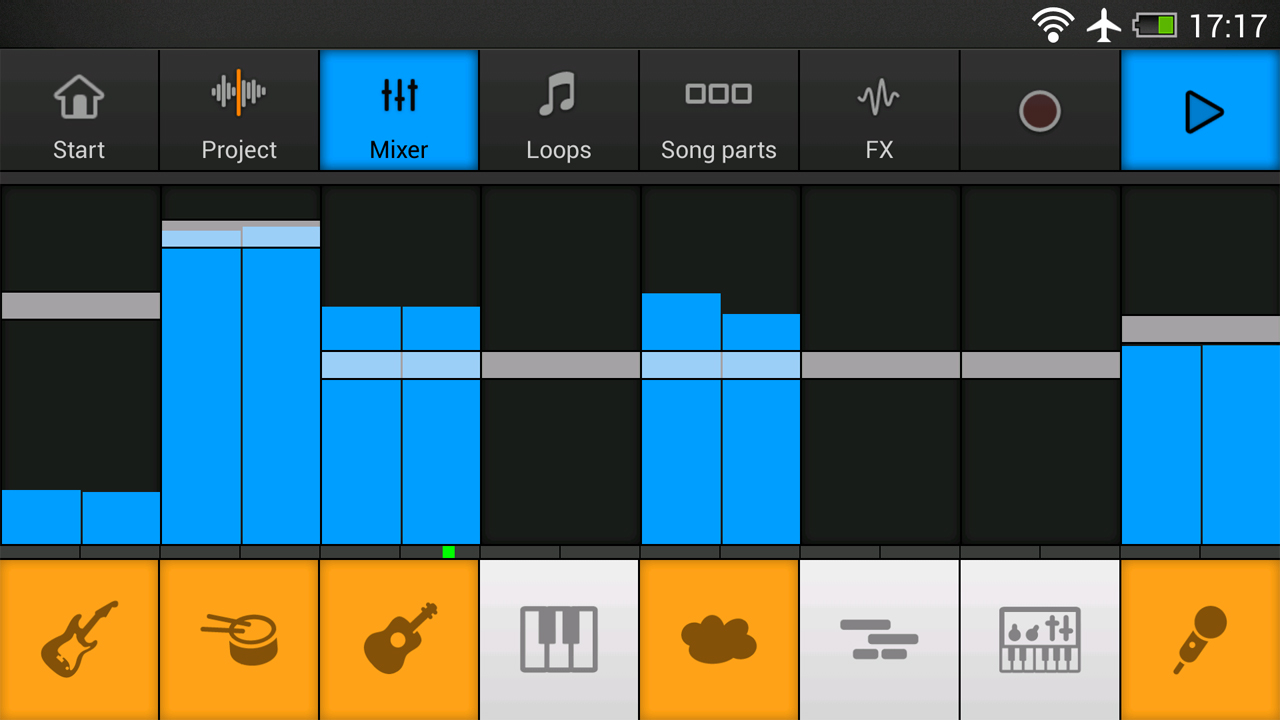
Image Source: KVR Audio
Music Maker JAM stands out from regular recording apps because it lets you create complete music productions instead of just capturing audio. This beat maker transforms your Android device into a portable studio that produces professional-quality tracks.
Key Features of Music Maker JAM
The app comes with over 300 Mix Packs that contain more than 500,000 loops in genres like Trap, EDM, Hip-Hop, Jazz, and Rock. You can record and mix perfectly with its 8-channel mixer or jam live. Musicians can adjust tempo and harmonies while adding effects like reverb, stutter, and delay in real time. The app lets you add vocals or rap to your tracks with autotune effects.
Music Maker JAM Pros and Cons
Pros:
- Easy-to-use interface that works well for beginners
- A shake feature that creates random loops when you need inspiration
- Quick sharing to YouTube, SoundCloud, and TikTok with one tap
- A thriving community with more than 10 million tracks
Cons:
- Most sound packs cost $1.99 each
- You can’t fully access other users’ tracks in the community section
- Some users report problems with customer support
Music Maker JAM Pricing
You can download and use the app free. Extra style packages will cost you about $1.99 each.
Who Should Use Music Maker JAM
Music Maker JAM works best for new music producers who want to start creating. DJs, beat makers, and anyone interested in making music without technical expertise will find this app valuable.
Comparison Table
| App Name | Key Features | Format Support | Cloud Integration | Pricing | Target Users | Notable Pro | Notable Con |
|---|---|---|---|---|---|---|---|
| Riverside | 48kHz WAV recording, separate tracks, Magic Editor | WAV, 4K video | Yes | Free-$79/month | Podcasters, content creators | Records locally for better quality | Takes time to learn |
| Lexis Audio Editor | 10-band equalizer, noise reduction | MP3, WAV, FLAC, M4A, AAC, WMA | Not mentioned | One-time purchase | Musicians, podcasters | Detailed editing tools | No multi-track support |
| ASR Voice Recorder | Skips silence, recording profiles | MP3, WAV, OGG, FLAC, M4A, AMR | Google Drive, Dropbox, OneDrive | Free-$9.99 lifetime | Students, professionals | Supports many formats | Free version has ads |
| Easy Voice Recorder | Records in background, Wear OS support | PCM, MP4, AMR (Free), MP3/FLAC/AAC (Pro) | Google Drive, Dropbox (Pro) | Free-$4.99 one-time | Students, business users | Easy to use | Basic free version |
| Dolby On | Auto studio effects, dynamic EQ | WAV | SoundCloud, Facebook, Instagram | Free | Musicians, songwriters | Studio-quality sound | Can’t pause while recording |
| Otter.ai | Transcribes in real-time, AI summaries | Not mentioned | Calendar integration | Free-$30/month | Sales teams, teachers, students | Easy to search transcripts | Free plan has time limits |
| Rev Voice Recorder | Live AI transcription, bookmarking | Not mentioned | Cloud sync available | Free app, paid transcription | Legal teams, researchers | Clear audio quality | Pays for transcription |
| Voice Record Pro | Records in multiple formats, audio effects | MP4, MP3, WAV | Google Drive, Dropbox, OneDrive | Free/$6.99 ad-free | Broadcasters, podcasters | Many export choices | Old-looking interface |
| Smart Recorder | Silence skip mode, spectrum analyzer | Wave/PCM | Cloud storage support | Free | Students, professionals | Shows storage use | No editing tools |
| Auphonic | AI audio processing | WAV, AAC | Yes | Free-$99/month | Podcasters, journalists | Smart audio improvement | Limited free processing |
| Anchor | Records remotely, background music | Not mentioned | Yes (Spotify) | Free | Podcast creators | Free hosting | Basic editing only |
| Cogi | Time-shift recording, highlight capture | WAV | Optional cloud storage | Free with premium options | Journalists, students | Records key moments only | Few format options |
| Hi-Q MP3 Recorder | Records MP3 in real-time | MP3, WAV, OGG, M4A, FLAC | Google Drive, Dropbox | Free (limited)/Paid version | Musicians, lecturers | High bitrate quality | Free version: 10-min limit |
| Samsung Voice Recorder | Multiple recording modes, text conversion | Not mentioned | No | Free (pre-installed) | Samsung device users | Works best with Samsung | Few export options |
| Music Maker JAM | 8-channel mixer, 500,000+ loops | Not mentioned | SoundCloud, YouTube, TikTok | Free with paid sound packs | New music producers | Simple to use | Most sounds cost extra |
Conclusion
The right audio recording app depends on what you need and want to achieve. We tested 15 amazing Android recording apps that each shine in different recording situations.
After thorough testing, I found that Riverside works best for professional content creators with its local recording tech and separate audio tracks. Musicians and songwriters will love how Dolby On adds studio-quality sound without any tech hassle. Easy Voice Recorder or Smart Recorder fits perfectly for students and business folks who need to record lectures and meetings. These apps have simple interfaces and can skip silent parts.
You don’t need to spend much to get a good recording app. Dolby On gives you professional features completely free, and Anchor lets you create and share podcasts at no cost. If you’re serious about audio, Lexis Audio Editor’s advanced editing tools are worth the one-time payment.
Sound quality depends on the technical specs. Apps that support high sample rates (44.1kHz or 48kHz) and formats like WAV or FLAC give you better audio quality but need more storage space. Apps like ASR Voice Recorder and Hi-Q MP3 Recorder keep your recordings safe with cloud backup that you can access from any device.
Your Android phone can be an amazing recording studio with the right app. To pick the best one, ask yourself: What will you record most often? Do you care more about sound quality or saving space? Do you need to edit your recordings? Will you share them with others?
These answers will help you pick the perfect app from our list. The recording studio you’ve been looking for might be right there in your pocket – you just need the right app to make it work.